On this page
- What Is Advanced Robotics Programming, Really?
- Why ROS Is the First Thing to Learn
- What You’ll Actually Do With ROS
- Computer Vision: Giving Your Robot Eyes
- Autonomous Navigation: Teaching a Robot to Find Its Way
- How Difficult Is It, and What Should You Learn First?
- What Can You Do After Learning Robotics Programming?
- Mistakes Beginners Should Avoid
- Build a Portfolio, Not Just a Certificate
- Ready to Start Your Robotics Journey?
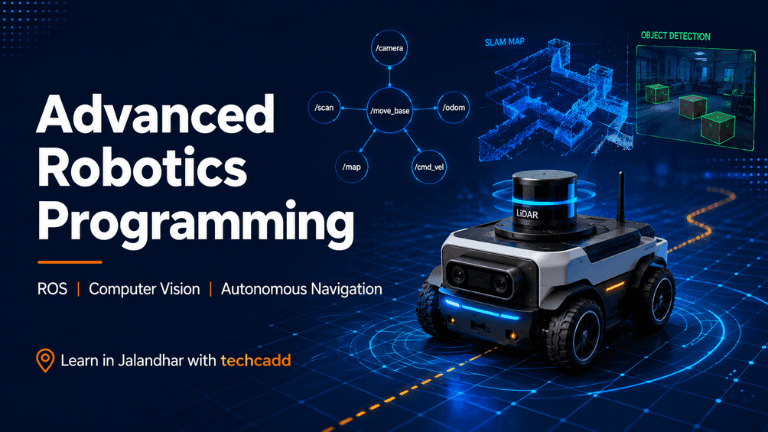
What Is Advanced Robotics Programming, Really?
Most of us meet robotics through a small line-following kit or an Arduino project in college. It’s fun, but then a question pops up: how do real robots, like warehouse bots or self-driving prototypes, actually work?
That gap is where advanced robotics programming begins. Instead of making a robot follow one fixed instruction, you teach it to sense its surroundings, make decisions and move safely without constant human control. Three skills sit at the centre of this: ROS, computer vision and autonomous navigation.
If that sounds heavy, relax. Every roboticist started by blinking an LED. You don’t need to be a genius, just curious and willing to practise.
Why ROS Is the First Thing to Learn
ROS (Robot Operating System) isn’t an operating system like Windows. Think of it as a toolkit and a messaging system that lets the different parts of a robot talk to each other. The camera, the wheels, the sensors and the decision-making code all run as separate pieces, and ROS passes information between them.
Without it, you’d write everything from scratch for every project. With it, you can reuse tested tools and focus on the actual problem you want to solve.
Students often ask, “Do I need to be an expert programmer first?” Not at all. Basic Python or C++ and some comfort with the Linux terminal is enough to begin. Many beginners struggle with Linux commands more than with robotics itself, so give that part extra time.
What You’ll Actually Do With ROS
Early on, you’ll learn about nodes, topics and messages. It sounds technical, but the idea is simple: one node reads a sensor, another decides what to do, and a third moves the motors.
You’ll also work with simulators like Gazebo, so you can test a robot on your laptop before touching real hardware. That saves money and a lot of frustration, especially when your first robot drives straight into a virtual wall (it will happen).
For learners in Jalandhar who want hands-on guidance instead of scattered video tutorials, structured training at techcadd gives you a clear path from the basics to working projects.
Computer Vision: Giving Your Robot Eyes
A robot with motors but no vision is basically moving blind. Computer vision is what lets it recognise objects, read signs, spot a person in its path or find a specific item on a shelf.
Most students start with OpenCV, a free library that works nicely with Python. Your first projects will feel almost magical: detecting a coloured ball, tracking a face or reading a QR code through a webcam. Then you move on to deep learning models that can recognise many different objects, which is how modern robots handle messy real-world scenes.
A common beginner mistake is jumping straight into complex AI models without understanding how an image is stored and processed. Spend a little time on the basics first, such as pixels, colour spaces and filtering. It makes everything that follows far easier to understand.
Autonomous Navigation: Teaching a Robot to Find Its Way
This is where everything comes together. Autonomous navigation means a robot can work out where it is, decide where to go and reach the destination without bumping into things.
Three ideas matter here:
Mapping and localisation (SLAM): the robot builds a map while figuring out its own position on it.
Path planning: it chooses the best route from point A to point B.
Obstacle avoidance: it reacts when a person, chair or box suddenly appears.
ROS has ready-made navigation tools that handle much of this, so you can concentrate on understanding how the pieces work together rather than coding every algorithm yourself.
How Difficult Is It, and What Should You Learn First?
Honestly, it’s challenging at times, but very doable if you go step by step. A sensible order looks like this:
Python basics and Linux terminal comfort
Core ROS concepts and simulation
Computer vision with OpenCV
Sensors, mapping and navigation
A complete mini project that combines everything
Don’t rush to step four. Students who skip the foundation usually get stuck and lose confidence, while those who build gradually end up surprised by how much they can do.
What Can You Do After Learning Robotics Programming?
This is the question that decides whether the effort feels worthwhile, so let’s answer it plainly. Robotics skills are used in far more places than most students expect: warehouse automation, manufacturing units, agricultural drones, delivery robots, inspection systems and research labs.
For a student in Jalandhar, with its strong manufacturing and industrial background, automation and smart machines are not distant ideas. They are slowly becoming part of the local industry, and people who understand both the programming and the hardware side are in demand.
Job roles you can aim for include:
Robotics software developer
Automation or ROS engineer
Computer vision engineer
Embedded and robotics intern
Research assistant in AI and robotics labs
Even if you don’t land a robotics job right away, these skills strengthen your profile for AI, embedded systems and automation roles.
Mistakes Beginners Should Avoid
A few patterns show up again and again:
Watching without building. Tutorials feel productive, but real learning starts when your code breaks and you fix it.
Skipping simulation. Testing on real hardware too early costs money and time.
Ignoring documentation. ROS documentation looks dull, but it solves half your problems.
Waiting to feel “ready.” Nobody feels ready. Start small and improve.
Build a Portfolio, Not Just a Certificate
Employers and interviewers care about what you can show. Create two or three projects, such as an obstacle-avoiding robot, an object-detecting camera system or a simulated delivery robot, and upload them with clear explanations on GitHub. A short demo video makes a big difference.
Ready to Start Your Robotics Journey?
If you want guided practice, mentor support, and projects that match real industry needs, techcadd's Robotics Course in Jalandhar offers a great opportunity to explore robotics and develop practical skills. Come with curiosity, bring your questions, and take the first step toward innovation. Your first working robot may be closer than you think!
Keep reading
- Essential Data Analytics Skills Every Student in Jalandhar Should LearnThinking about a career in data? Discover the core data analytics skills students in Jalandhar should learn first, from Excel and SQL to visualization and clear thinking, and how to build them step by step with techcadd.
- SQL for Data Science: Why It Matters and How to Learn It in JalandharThinking about a data science career? Start with SQL. Learn why employers expect it first, what beginners should practise, and how students in Jalandhar can build job-ready database skills with techcadd.
- How to Learn Sensor Interfacing Through Live Projects in JalandharStruggling to move from theory to real circuits? Learn how sensor interfacing through live projects in Jalandhar helps you build practical skills, avoid beginner mistakes, and get job-ready with hands-on guidance from techcadd.
Comments
Loading…