On this page
- Why Sensor Interfacing Feels Hard at First
- What Sensor Interfacing Actually Means
- Why Live Projects Teach Faster Than Theory
- Where Should a Beginner Start?
- Live Project Ideas Students Can Try
- Common Mistakes Beginners Make
- How techcadd Helps You Learn Through Live Projects
- What You Can Do After Learning Sensor Interfacing
- A Simple Plan to Get Started This Month
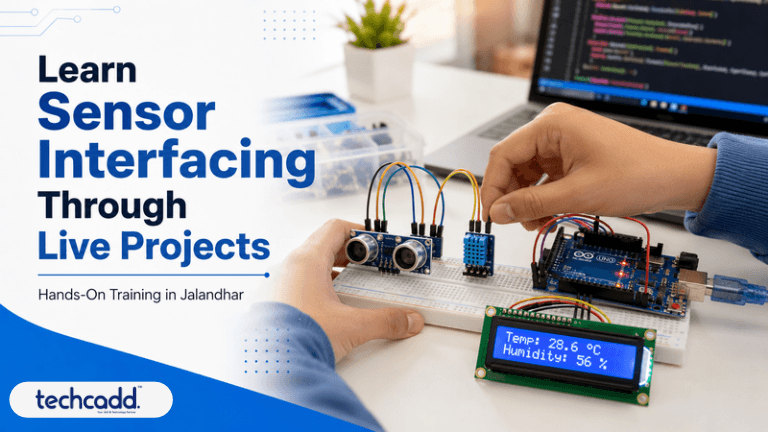
Why Sensor Interfacing Feels Hard at First
You open a datasheet, see pin diagrams and voltage tables, and suddenly a tiny temperature sensor feels like rocket science. If that sounds familiar, you’re not alone. Many students in Jalandhar who start with electronics or embedded systems hit the same wall. The theory makes sense in class, but the moment they connect a real sensor to a real board, nothing works.
Usually the problem isn’t you. It’s how the subject gets taught. Reading about analog and digital signals is one thing. Watching your own circuit finally show the correct reading on a screen is something else entirely.
What Sensor Interfacing Actually Means
Sensor interfacing means connecting a sensor to a microcontroller, such as an Arduino, ESP32 or Raspberry Pi, so the board can read real-world data and act on it. A temperature sensor tells the board how hot a room is. An ultrasonic sensor measures distance. A gas sensor detects smoke. Your code then decides what happens next: switch on a fan, sound a buzzer, or send an alert to your phone.
That’s the whole idea. Smart home gadgets, automatic factory machines and even the parking sensors in modern cars all run on this same loop of sensing, thinking and acting.
Why Live Projects Teach Faster Than Theory
Most beginners discover this late: you remember what you fix, not what you read. When a sensor gives you strange values and you spend an hour tracing a loose wire or a wrong pin setting, that lesson stays with you.
Live projects put you face to face with real problems like noisy readings, power issues, wiring mistakes and code bugs. These are exactly the things employers expect you to handle, and no textbook can fully prepare you for them.
At techcadd in Jalandhar, learners work on actual builds instead of only watching demonstrations, so every concept connects to something they have physically made with their own hands.
Where Should a Beginner Start?
“Do I need previous experience?” Honestly, no. If you know basic electronics terms and can follow simple logic, you can begin. Start with an Arduino board and three easy sensors: a temperature sensor like the DHT11, an ultrasonic sensor (HC-SR04), and a simple IR sensor. These teach you the core ideas of digital input, analog input and timing without overwhelming you.
Once those feel comfortable, move to gas sensors, soil moisture sensors and motion detectors. Each new sensor adds one new concept, and that slow build-up is what makes the learning stick.
Live Project Ideas Students Can Try
Pick projects that solve a small, real problem. Here are a few that work well for students:
Smart dustbin: An ultrasonic sensor opens the lid when someone walks near.
Room temperature monitor: Shows live readings on an LCD and triggers a fan above a set limit.
Plant watering system: A soil moisture sensor starts a small pump when the soil dries out. This one suits Punjab’s agricultural surroundings well.
Home safety alarm: A gas or flame sensor sounds a buzzer and sends an alert.
Each of these takes a few days, not months, and each one looks great in a portfolio or on a resume.
Common Mistakes Beginners Make
Almost everyone repeats these at the start, so don’t feel bad if you do too:
Wrong power supply. Some sensors need 3.3V, others 5V. Mixing them up can damage a sensor.
Forgetting a common ground. If the grounds aren’t connected, readings turn random.
Copying code without understanding it. It works once, then you’re stuck the moment something changes.
Skipping calibration. Raw sensor values rarely match reality until you adjust them.
Giving up too early. A sensor that “doesn’t work” is usually a wiring issue, not a failure on your part.
When you build with a mentor nearby, these mistakes get caught in minutes instead of costing you days of frustration.
How techcadd Helps You Learn Through Live Projects
Learning alone from videos works up to a point, but it can’t look at your circuit and tell you which wire is wrong. That’s where guided, hands-on training makes a real difference. At techcadd in Jalandhar, students work on practical sensor projects with trainers who sit beside them, check their wiring, explain why a reading looks odd, and push them to understand the code instead of just copying it.
You also get to work with real components, not only simulators. Simulators are useful for practice, but handling an actual board, sensor and breadboard teaches you things a screen never will, like how a loose jumper wire can ruin an hour of work.
What You Can Do After Learning Sensor Interfacing
“Will this skill actually help my career?” Yes, and in more places than most students expect. Sensor interfacing is the base for embedded systems, IoT, automation, robotics and smart device development. Local industries around Punjab, from manufacturing units to agri-tech and electronics workshops, increasingly rely on sensor-based monitoring and automation.
With a few solid projects behind you, you can apply for roles like embedded trainee, IoT developer, electronics technician or automation assistant. You can also build a final-year project that stands out, or take on small freelance work like home automation setups.
A Simple Plan to Get Started This Month
You don’t need to learn everything at once. Try this:
Week 1: Learn basic circuits, breadboard use and Arduino programming.
Week 2: Build two beginner projects with the DHT11 and ultrasonic sensor.
Week 3: Add an output, like an LCD, buzzer or relay, and make your project respond.
Week 4: Finish one complete project, document it with photos and notes, and show it to someone for feedback.
Keep a small notebook of every error you face and how you solved it. Months later, that notebook will be more valuable than any textbook you own.
If you’re serious about turning curiosity into real skill, visit techcadd in Jalandhar, ask about live project training, and start building your first sensor project. One working circuit will do more for your confidence than a hundred pages of theory.
Filed under
Keep reading
- Essential Data Analytics Skills Every Student in Jalandhar Should LearnThinking about a career in data? Discover the core data analytics skills students in Jalandhar should learn first, from Excel and SQL to visualization and clear thinking, and how to build them step by step with techcadd.
- SQL for Data Science: Why It Matters and How to Learn It in JalandharThinking about a data science career? Start with SQL. Learn why employers expect it first, what beginners should practise, and how students in Jalandhar can build job-ready database skills with techcadd.
- What Is React JS? A Beginner’s Guide to React Development in JalandharThinking about learning React JS but not sure where to start? This beginner-friendly guide explains what React is, why developers love it, and how students in Jalandhar can start building a career in React development with techcadd.
Comments
Loading…