On this page
- How Does a Cyber Attack Actually Begin?
- What Is a Cyber Attack, in Simple Words?
- Step 1: Reconnaissance (Gathering Information)
- Step 2: Scanning (Looking for Weak Spots)
- Step 3: Gaining Access (Getting Through the Door)
- Step 4: Privilege Escalation (Getting More Power)
- Step 5: Maintaining Access and Moving Around
- Step 6: Achieving the Goal (The Real Damage)
- Step 7: Covering Tracks
- How Can the Chain Be Broken?
- Can You Build a Career in This?
How Does a Cyber Attack Actually Begin?
Most students imagine a hacker as someone in a dark room typing green code at lightning speed. Real attacks are much less dramatic. They are slow, planned, and often start with something ordinary, like a public Instagram profile or an old college email ID.
If you have ever asked yourself, “How do hackers actually get in?”, the honest answer is: one step at a time. Once you understand those steps, cybersecurity stops feeling like magic and starts feeling like a skill you can learn, even if you are just starting out in Jalandhar.
What Is a Cyber Attack, in Simple Words?
A cyber attack is any attempt to get into a computer, network, or account without permission, usually to steal data, spy, or cause damage. The target could be a large company, a local shop, or a student’s laptop.
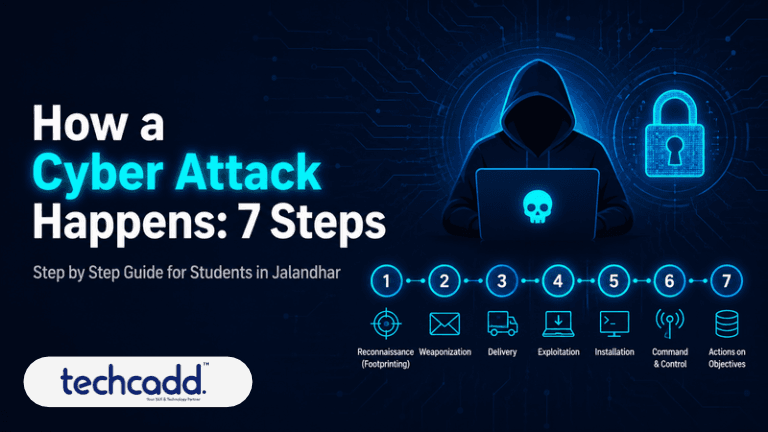
Security experts describe an attack as a chain of stages. Break one link, and the whole chain falls apart. That idea is the foundation of everything defenders do.
Step 1: Reconnaissance (Gathering Information)
Before touching a system, an attacker studies it. Think of a thief who watches a house for a week before trying the door.
They usually look for:
Employee names and email formats on company websites
Job posts that reveal which software a company uses
Social media posts, ID card photos, even Wi-Fi names
Public domain and website details
None of this is illegal on its own, which is why people overlook it. A cheerful “Just joined my new internship!” post with a badge photo can give away more than you would expect.
Step 2: Scanning (Looking for Weak Spots)
Now the attacker starts knocking on doors. Using special tools, they check which devices are online, which ports are open, and which software versions are running. Old, unpatched software is like a window someone forgot to lock.
Here is a mistake many beginners make: “My system is too small to be a target.” Automated scans don’t care about size. They check thousands of systems at once and simply see who answers.
Step 3: Gaining Access (Getting Through the Door)
This is the moment most people picture as “the hack,” but it is usually far less technical than you would think. The most common entry points are:
Phishing emails or messages: A fake “Your account will be blocked, click here” message that looks real enough to trick you.
Weak or reused passwords: If your Instagram, email, and college portal all share one password, cracking one opens all three.
Unpatched software: The outdated software found during scanning gets used here.
Infected downloads: Cracked software and pirated games often come with unwanted extras.
Many students ask, “Do attackers really need advanced skills for this?” Not always. Plenty of successful attacks work because someone clicked a link in a hurry. That is why understanding human behaviour matters as much as understanding computers.
Step 4: Privilege Escalation (Getting More Power)
Getting in is only the beginning. Often, the first account an attacker reaches is a normal user account with limited access, like a library login that can only view a few pages.
So the next goal is to climb higher. The attacker looks for ways to become an administrator, someone who can install software, change settings, and see everything. Think of it as entering a building with a visitor pass and then trying to find the master key.
Step 5: Maintaining Access and Moving Around
A smart attacker does not want to repeat the hard work every time. They create a hidden way back in, such as a secret account or a small program that keeps running quietly.
After that, they move sideways across the network, checking other computers, shared folders, and servers. A single compromised student laptop can become a stepping stone to a much bigger target.
Step 6: Achieving the Goal (The Real Damage)
Everything so far was preparation. Now the attacker does what they came for. That could mean stealing personal data, locking files and demanding money (ransomware), grabbing bank details, or simply shutting a service down.
This is usually the point when the victim finally notices something is wrong. A password stops working, files disappear, or strange transactions show up. By then, the attacker has often been inside for a long time.
Step 7: Covering Tracks
Before leaving, a careful attacker deletes logs, hides files, and removes signs of entry. This is why investigators need special skills to piece together what happened afterwards. It is also a whole career path called digital forensics.
How Can the Chain Be Broken?
Here is the good news. Defenders only need to break one link, and each step has a counter:
Reconnaissance: Think before sharing personal or work details online.
Scanning: Keep software and systems updated.
Gaining access: Use strong, unique passwords, turn on two-factor authentication, and never click links in panic.
Escalation and movement: Give people only the access they truly need.
Final stages: Keep regular backups and monitor for unusual activity.
Can You Build a Career in This?
Many students worry, “Do I need to be a coding genius?” You don’t. Curiosity, patience, and a willingness to practise matter far more than being a topper. Start with networking basics, learn how operating systems work, then move into ethical hacking tools in a safe lab setup.
If you want guided, hands-on learning in Jalandhar, techcadd offers practical training where you learn how attacks work so you can stop them legally and professionally.
Understanding this seven-step chain is your first real move toward thinking like a defender. Next time you get a suspicious message, you will know exactly which link you are about to break.
Filed under
Keep reading
- The IT Industry in 2026: 8 Trends, In-Demand Skills and Career Paths in IndiaIndia's tech industry is set to reach US$315 billion in FY26, but employers now want skills, not just degrees. Harrachneet Kaur Sandhu of techcadd explains the 8 IT trends shaping 2026, the most in-demand skills, and practical steps to build a future-ready tech career.
- How to Protect Yourself from Cyber Attacks: A Practical Guide for Students in JalandharPhishing links, fake job offers, weak passwords: cyber attacks target students more than you think. Learn simple, practical steps to stay safe online, with guidance from techcadd for students and beginners in Jalandhar.
- Advanced Data Visualization in Jalandhar: Learn Dashboards, DAX & Interactive Reports with techcaddConfused by dashboards and DAX formulas? Learn what advanced data visualization really involves, what to master first, and how techcadd in Jalandhar helps students build interactive reports that employers notice.
Comments
Loading…