On this page
- Why Visitors Don’t Always Become Customers
- What Is a Conversion Funnel?
- Where Customers Usually Slip Away
- Retargeting: Bringing Back People Who Almost Bought
- How Retargeting Works in Practice
- Customer Analytics: Let the Data Tell the Story
- Putting It All Together: A Simple Example
- What Should You Learn First?
- Learn It Hands-On at techcadd
Why Visitors Don’t Always Become Customers
Imagine you’ve launched an online store selling suits, sports gear or handmade jewellery. An Instagram ad brings 500 visitors this week, but when you check your orders, there are only three. What went wrong?
Almost every beginner in e-commerce marketing asks this at some point. Traffic alone doesn’t pay the bills. What matters is how many visitors actually buy, and that is exactly what advanced e-commerce marketing helps you understand and improve. For students in Jalandhar who want a digital marketing career, or who dream of running their own online business, it’s one of the most practical skills you can pick up.
What Is a Conversion Funnel?
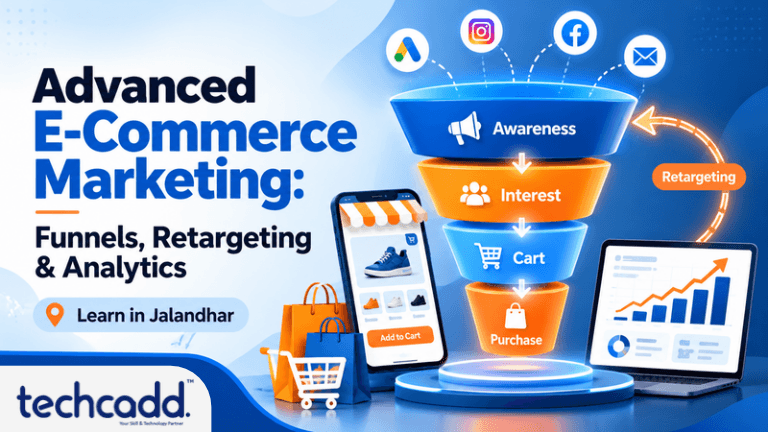
A conversion funnel is the path a person takes from first noticing your brand to completing a purchase. It’s called a funnel because people drop off at every step, so the numbers shrink as you move down.
A simple e-commerce funnel looks like this:
Awareness: Someone sees your ad, reel or Google result.
Interest: They click through and start browsing your products.
Consideration: They add an item to the cart or compare options.
Purchase: They enter their details and pay.
Loyalty: They return for a second order or recommend you to friends.
Where Customers Usually Slip Away
Here’s what many beginners miss: the problem is rarely the ad. It’s usually something quieter, like a product page that loads slowly on a phone, or a checkout that asks for too many details. Sometimes shipping charges only show up at the last step. Sometimes there’s no Cash on Delivery option, which matters a lot to many buyers in Punjab.
Once you map your funnel, you can see exactly which step is leaking customers and fix that one thing first, instead of guessing or simply spending more on ads.
Retargeting: Bringing Back People Who Almost Bought
Think about the last time you added something to your cart and then closed the tab because your phone rang or you wanted to compare prices. A day later, you saw that same product in an Instagram ad. That’s retargeting.
Most visitors don’t buy on their first visit. Studies and platform data from Meta and Google consistently show that a large share of carts are abandoned, so chasing only new visitors means ignoring people who already showed real interest. Retargeting simply shows your ads to people who have already visited your store, viewed a product or started checkout.
How Retargeting Works in Practice
You install a small tracking tool, like the Meta Pixel or Google tag, on your website. It quietly notes what visitors do. Then you create audiences based on that behaviour, for example:
People who viewed a product but didn’t add it to cart
People who added to cart but didn’t pay
Past customers who haven’t ordered in 60 days
Each group needs a different message. Someone who abandoned their cart might need a gentle reminder or a small offer. A past customer might respond better to a new arrival. Sending the same ad to everyone is one of the most common beginner mistakes, and it can feel annoying instead of helpful.
Retargeting also has limits. Showing the same ad ten times a day makes people tune out, so frequency control matters. And if your product page has real problems, like unclear pricing or poor photos, retargeting won’t rescue it.
Customer Analytics: Let the Data Tell the Story
This is where many students feel nervous. “I’m not a numbers person” is something trainers hear often. The good news is that analytics is less about maths and more about asking sensible questions:
Which product pages do people leave from?
Which ad brings visitors who actually buy, not just click?
Do mobile users convert as well as desktop users?
How much does it cost to win one customer, and how much does that customer spend over time?
Tools like Google Analytics 4 and your store’s dashboard answer these questions. Start with just three numbers: conversion rate, cart abandonment rate and cost per purchase. Once those make sense, everything else becomes easier to learn.
Putting It All Together: A Simple Example
Let’s say a small online store in Jalandhar sells sportswear. Here’s how the three pieces work together.
First, the owner studies the funnel and notices that many people add items to the cart but only a few complete payment. Analytics shows that most of them are on mobile, and the checkout page takes ages to load.
Second, she fixes the page speed and adds a Cash on Delivery option. Then she sets up a retargeting ad for cart abandoners with a short, friendly reminder and free delivery on the first order.
Third, she checks her numbers two weeks later. Cart abandonment has dropped, and cost per purchase is lower than before. She didn’t spend more on ads. She simply understood her customers better.
That’s the real power of these three skills. Funnels show you where the problem is, analytics explains why, and retargeting helps you win people back.
What Should You Learn First?
If you’re starting out, don’t try to master everything at once. A sensible order looks like this:
Understand the basics of digital marketing and how online stores work
Learn Google Analytics 4 and read your first few reports
Set up tracking with the Meta Pixel and Google tag
Build simple retargeting campaigns and test one change at a time
Practise on a real or demo store, because hands-on work teaches more than theory
A common beginner mistake is jumping straight into running ads without understanding the numbers behind them. Another is changing five things at once, which makes it impossible to know what actually worked. Go slowly, test one thing, and learn from the result.
Learn It Hands-On at techcadd
Reading about funnels is useful, but you only truly understand them when you work on live campaigns, real dashboards and actual customer data. If you’re in Jalandhar and want to build a career in digital marketing or e-commerce, practical training at techcadd can help you move from theory to real skills, with guidance from people who know where beginners usually get stuck.
You don’t need to be an expert to begin. You just need to start, stay consistent and keep asking why customers do what they do.
Keep reading
- Advanced Data Visualization in Jalandhar: Learn Dashboards, DAX & Interactive Reports with techcaddConfused by dashboards and DAX formulas? Learn what advanced data visualization really involves, what to master first, and how techcadd in Jalandhar helps students build interactive reports that employers notice.
- What Are AI Agents? A Beginner’s Guide for Students in JalandharCurious about AI agents but not sure where to start? This beginner-friendly guide explains what AI agents are, how they work, and why students in Jalandhar should start learning about them with techcadd.
- How to Learn C++ from Scratch: A Beginner’s Roadmap for Students in JalandharStarting C++ from zero and not sure where to begin? This step-by-step beginner’s roadmap shows what to learn first, how to practise, which mistakes to avoid, and how students in Jalandhar can build strong programming skills with proper guidance from techcadd.
Comments
Loading…