Web Designing Certificate Program in Jalandhar
Learn practical frontend development with HTML5, CSS3, JavaScript and Bootstrap — designed for students, graduates and working professionals who want job-ready web design skills.
- Live client projects
- Practitioner trainers
- Placement support
- Certificate + internship

- Duration
- 3 Months
- Syllabus
- 9 Capabilities, 6 Projects
- Mode
- Classroom, Weekend & 1-on-1
- Includes
- Deployed Portfolio Site
- Students trained
- 25,000+Students trainedsince 2016
- Google rating
- 4.9★Google rating556+ reviews
- Practical training
- 100%Practical traininglive client work
Course overview
techcadd's Web Designing Certificate Program in Jalandhar is a focused three-month course for people who want practical, job-ready frontend skills rather than theory. It starts with HTML5 document structure and CSS3 styling, then moves into Flexbox, CSS Grid, transitions and animations, before adding JavaScript for DOM manipulation, events and form validation. Bootstrap and its component library follow, then advanced UI work covering responsive patterns, accessibility and performance. Across nine capabilities and six shipped projects — a responsive business website, a landing page, an interactive portfolio, an e-commerce product page, a live client brief and a capstone — you build on real, trainer-reviewed briefs rather than isolated exercises, and the capstone deploys live on GitHub Pages, so you finish with a public site rather than a folder of files on your laptop.
One skill set,many kinds of website work
Web designing is the craft of building the part of a website people actually see and use: the layout, colours, text, images, buttons and forms, and how all of it rearranges itself on a phone, tablet or laptop. It is built with three languages: HTML for the structure, CSS for the look and layout, and JavaScript for the interactive parts.
Think of a website like a shop on GT Road. Web design is the shopfront, the shelves and the counter: what a customer walks into. The stockroom, the billing system and the accounts behind the counter are the backend, which is a different job. This course trains you to build the shopfront properly and responsively, and the fields below show how much of each related career it covers.
- Job-ready focus2 fields
- The course trains you for entry-level work in this field.
- Strong foundation2 fields
- You learn the base skills here; one specialised course makes you job-ready.
- Introduced1 field
- You will use it in the course, but it is not a specialisation.
- Not covered2 fields
- Not part of this course; available as a separate techcadd course.
What this course makes you job-ready for
Job-ready focusResponsive Website Design
Turning a business's needs into a clean, multi-page website that looks right and works on every screen size, from a phone to a wide monitor.
A five-page site for a Jalandhar coaching institute (home, courses, faculty, results, contact) that reads just as well on a parent's phone as on a laptop.
- Web Designing tools used
- HTML5CSS3FlexboxCSS Gridmedia queriesBootstrap 5
- Job roles
- Web DesignerJunior Web DesignerFreelance Web Designer
The core of the course: Foundations of Web Design, CSS3 & Responsive Design and Bootstrap & Component Libraries. Projects: Responsive Business Website, Capstone Web Design Project.
Landing Pages & Marketing Websites
Single, focused pages built to make a visitor do one thing: fill an enquiry form, book a call or buy a product. Digital marketing agencies need these constantly for their ad campaigns.
A landing page for a new gym in Model Town that a Facebook ad sends people to, with a sticky "Book a free trial" button and a short enquiry form.
- Web Designing tools used
- HTML5CSS3BootstrapCSS animationsform validation
- Job roles
- Web DesignerLanding Page DesignerWeb Designer at a digital marketing agency
Bootstrap & Component Libraries and the forms work in Foundations of Web Design. Project: Modern Landing Page.
What this course lays the foundation for
Strong foundationFront-End Development (Interactive Interfaces)
Making a page respond to the user: filters, image galleries, tabs, pop-ups, form checks and data loaded without refreshing the page. At job level this increasingly means a JavaScript framework such as React.
A product page where tapping a colour swaps the photo and the price, and "Add to cart" updates the cart count instantly.
- Web Designing tools used
- JavaScriptDOMFetch APIjQueryReact (not taught here)
- Job roles
- Front-End DeveloperJunior Front-End DeveloperUI Developer
JavaScript & Interactivity teaches variables, functions, DOM manipulation, events, form validation and the Fetch API, used in the Interactive Portfolio Website and E-commerce Product Page. Frameworks such as React are taught in techcadd's Web Development and MERN Stack courses.
Accessible, Fast & Search-Friendly Websites
Building sites that load quickly, work for people using screen readers or keyboards, and are structured so search engines can understand them.
Fixing a slow restaurant website so it scores well in a Lighthouse audit and its menu page shows up properly in Google.
- Web Designing tools used
- Semantic HTMLLighthouseChrome DevToolsARIA labelsCSS variables
- Job roles
- Web DesignerFront-End DeveloperWebsite Executive
Advanced UI & Modern Design covers accessibility, performance optimisation and Lighthouse; the Capstone applies accessibility standards and SEO best practices. Ranking a site in Google as a career is taught in techcadd's SEO course.
What this course introduces
IntroducedUI/UX Design
Deciding how an app or website should look and feel before it is built: researching users, sketching wireframes, designing screens and testing whether people can actually use them.
Redesigning a hospital's appointment-booking flow so an elderly patient can book in three taps instead of eight.
- Web Designing tools used
- FigmaAdobe XDwireframesuser researchprototyping
- Job roles
- UI DesignerUX DesignerProduct Designer
You meet Figma and Adobe XD, apply accessibility and micro-interactions in Advanced UI & Modern Design, and create wireframes in the Live Client Brief. Full user research and design process is taught in techcadd's UI/UX Design course.
Not part of this course
Not coveredWordPress & CMS Websites
Building and managing websites on a content management system such as WordPress, where the owner can edit pages and add products without touching code.
A clinic website where the receptionist updates doctor timings herself from a dashboard.
- Web Designing tools used
- WordPressGutenbergElementorWooCommerce
- Job roles
- WordPress DeveloperWebsite Manager
Not part of this course. The HTML and CSS you learn here makes WordPress much easier to customise, and it is taught in full in techcadd's WordPress course.
Backend & Full-Stack Web Development
The behind-the-scenes half of a website: servers, databases, user accounts and APIs that save and process data.
The system that stores every student's login, fee record and marks for a school portal.
- Web Designing tools used
- Node.jsExpressMongoDBSQLPHPPython
- Job roles
- Backend DeveloperFull-Stack Developer
Not part of this course. You learn how the client-server model works and use the Fetch API to call a backend, which is the bridge into techcadd's Web Development, MERN Stack or PHP Full Stack course.
Clearing up common confusions
Is web designing the same as web development?
They overlap, but not fully. Web designing (this course) builds the front-end: everything a visitor sees and clicks. Web development usually also means the backend: servers, databases, logins and APIs that store and process data. If you want to build complete applications, add techcadd's Web Development or MERN Stack course after this one.
Web designer, UI/UX designer, graphic designer: what is the difference?
A web designer builds working web pages in code. A UI/UX designer plans how screens should look and behave, usually in Figma, and often hands the design to a developer. A graphic designer makes visuals such as logos, posters and social media creatives. This course makes you a web designer; UI/UX and graphic design each have their own techcadd course.
Web design skills also show up in…
Responsive HTML email templates for newsletters, website maintenance and content updates for local businesses, digital marketing teams that need quick page changes, and e-learning or educational websites. These are not separate modules in this course, but the HTML, CSS and JavaScript you learn here is exactly what they use.
At a glance: what this course covers
| Field | Coverage in this course | Where you learn it | Next step at techcadd |
|---|---|---|---|
| Responsive Website Design | Job-ready focus | Foundations, CSS3 & Responsive Design, Bootstrap; Projects 1, 6 | Ready to apply |
| Landing Pages & Marketing Sites | Job-ready focus | Bootstrap & Component Libraries; Project 2 | Ready to apply |
| Front-End Development | Strong foundation | JavaScript & Interactivity; Projects 3, 4 | Web Development or MERN Stack |
| Accessible, Fast & SEO-Friendly Sites | Strong foundation | Advanced UI & Modern Design; Capstone | SEO course |
| UI/UX Design | Introduced | Advanced UI; Live Client Brief | UI/UX Design course |
| WordPress & CMS Websites | Not covered | — | WordPress course |
| Backend & Full-Stack | Not covered | — | Web Development, MERN Stack |
Which Web Designing pathsuits you?
You do not need to know your exact direction before you join. Everyone starts with the same HTML, CSS and JavaScript, and most students find out what they enjoy while building the six projects. If you already have a leaning, this guide helps:
| If you… | You will probably enjoy | Typical first job |
|---|---|---|
| Like making things look neat, balanced and easy to use | Responsive Website Design | Web Designer |
| Enjoy logic and want buttons, filters and forms to actually work | Front-End Development | Junior Front-End Developer |
| Care more about how people use a screen than how it is coded | UI/UX Design | UI Designer (after the UI/UX Design course) |
| Want to work at a digital marketing agency | Landing Pages & Marketing Websites | Web Designer at an agency |
| Want to build complete apps with logins and databases | Full-Stack Web Development | Full-Stack Developer (after Web Development or MERN Stack) |
| Want to freelance for local shops and businesses | Small-business websites | Freelance Web Designer |
| Are not sure yet | Start with this course | Decide with your trainer once you have shipped a few projects |
Industry-Ready Training in Web Designing
- 100% practical, project-based learning
- AI tools integrated into every module
- Live client projects under trainer supervision
- Internship letter and placement support
- Small batches with daily doubt clearing
What you will
actually build
This syllabus is designed to produce working output at every stage, not just notes and theory. You move from HTML5 and CSS3 to JavaScript and Bootstrap, building everything from static landing pages to fully responsive, interactive websites, and finishing with a portfolio-grade capstone built on live client requirements. The structure follows the way a real web project is built: foundations first, then applied design work, then portfolio and placement preparation. Months 1–2 cover the core frontend stack; Month 3 is live client work, the capstone and placement preparation.
Foundations of Web Design
- Introduction to the internet, client-server architecture and web workflows
How a browser request actually reaches a server and comes back as a page — requests, responses, hosting and version control — the mental model every later module about responsive sites and deployment builds on.
- HTML5 document structure, headings, lists, links and semantic elements
Writing markup with header, nav, section and article rather than a wall of generic divs, so pages read correctly to screen readers and search engines rather than just looking right in a browser.
- Forms and input elements
Text, email, radio, checkbox and select inputs wired with labels and validation attributes — the enquiry and sign-up forms every one of the six client-facing project sites in this programme needs to actually work.
- Tools: VS Code, web browsers, DevTools
Setting up the daily toolchain — VS Code extensions, live reload and the browser's Elements and Console panels — so you can inspect and fix a layout instead of guessing at it.
Useful for: Every web career. HTML structure and forms are the base of all website work.
Build Web Skills Employers Can Verify
- Live client projects from week one, reviewed by mentors and designed to become portfolio work you can show in interviews.
- Freshers with a working web design portfolio move into Web Designer, Frontend Developer and UI/UX Designer roles starting around ₹15,000 – ₹25,000 a month in Punjab.
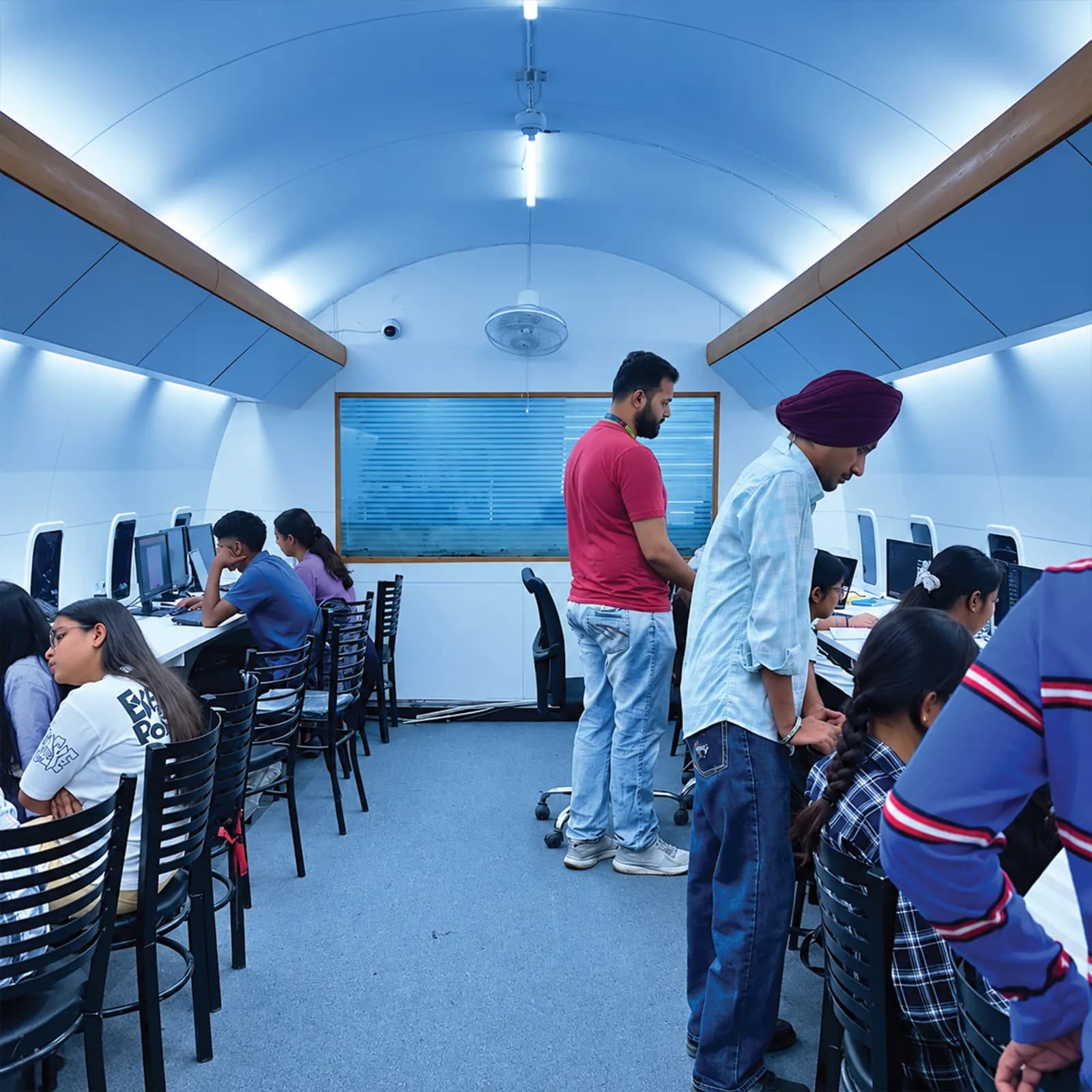 Reviewed by mentors. Built for interviews.
Who can dothis course
The Web Designing programme is built for people at six different starting points, and the batch is deliberately mixed. What matters far more than your background is turning up consistently and finishing what each module asks you to build.
Students after 12th
Join from any stream. You start from fundamentals with no assumed knowledge, and most students run the programme alongside a degree at a Jalandhar college using the weekday or weekend batch.
Graduates and final-year students
If you are finishing a BA, BBA, B.Com, BCA or B.Tech, this is the shortest route from degree to salary. Enter placement season with a live responsive website in hand instead of a blank CV.
Working professionals
The weekend batch exists for people already earning. Career switchers typically become interview-ready for Junior Web Designer roles within three months without leaving their current job.
Business owners and freelancers
Owners take this programme to stop outsourcing work they cannot judge. Freelancers join it to bill clients beyond Punjab, since location does not limit remote work in the design field.
Career restarters
A gap on the CV counts for less than work you can point to. The programme starts at zero and finishes with a portfolio and a documented internship letter, which is what an interviewer asks about after a break.
Educators and researchers
Lecturers and research scholars join this programme to apply design inside their own domain — creating educational websites, digital portfolios and interactive content — rather than to leave it. You bring the subject; the programme supplies the HTML, CSS and JavaScript around it.
One course.A mesh of real tools.
Everything below is installed on the lab machines and used on live client work, not shown once in a slide and forgotten.
 Git & GitHub
 Chrome DevTools
- HTML5
- The language that gives every web page its structure
- CSS3
- Controls colours, fonts, spacing and the responsive layout
- JavaScript
- Adds interactivity such as filters, sliders and form checks
- Bootstrap
- A ready-made framework for building responsive layouts quickly
- VS Code
- The code editor where you write and preview your pages
- Git & GitHub
- Saves every version of your code and shows your work to employers
- Figma
- A design tool for planning screens and wireframes before coding
- Chrome DevTools
- Inspects and debugs a live page right inside the browser
- Sass
- A CSS preprocessor that adds variables and nesting to large stylesheets
- Tailwind CSS
- A utility-first CSS framework used widely in modern projects
- jQuery
- An older JavaScript library you will still meet on many existing sites
- NPM
- Installs the packages and tools a modern front-end project uses
- GitHub Pages
- Free hosting that puts your finished site on a public link
- Canva
- Quick graphics and banners for the sites you build
- Adobe XD
- A design and prototyping tool for website and app screens
Get Certified in
Web Designing
Complete the course with a portfolio of live projects and receive an industry-recognised certificate, plus a documented internship letter accepted by Punjab universities.
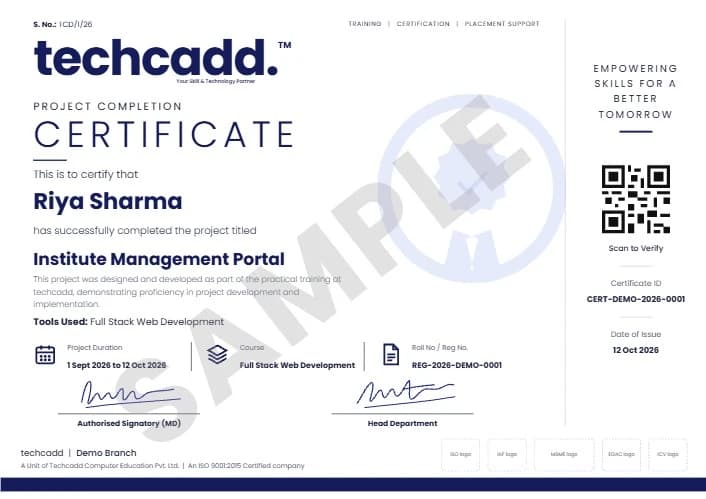
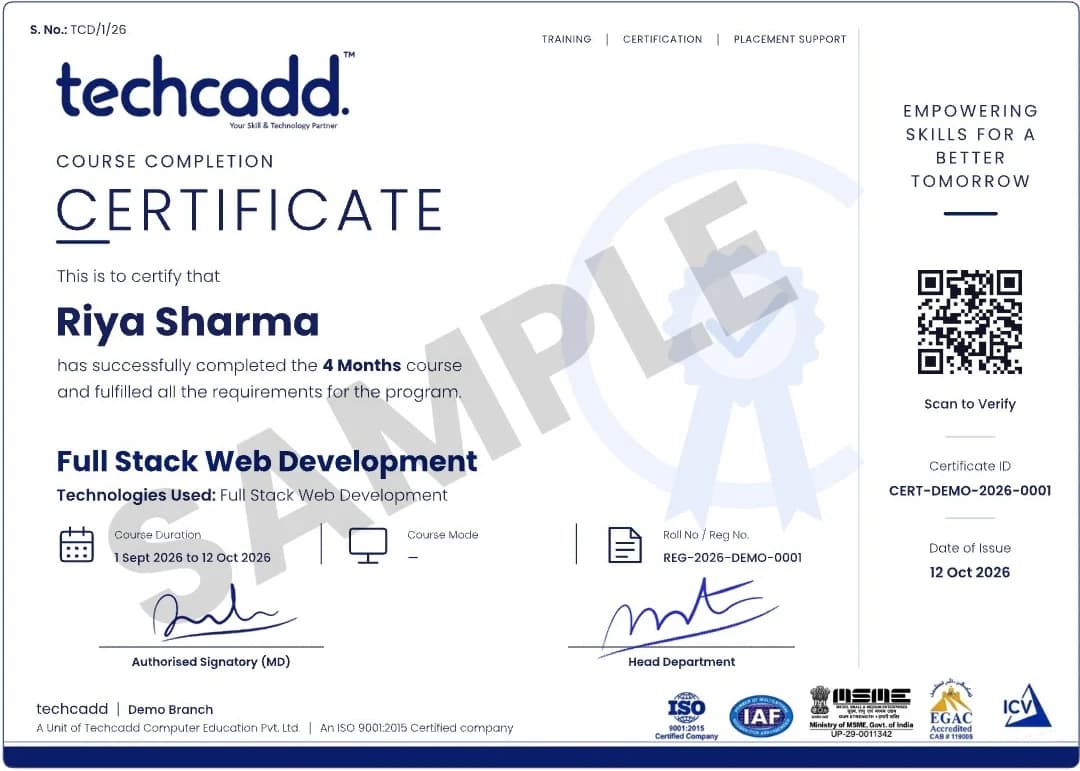
Two certificates on completion — the course certificate and a separate capstone project certificate.
Where this coursetakes you
The roles this opens, what they pay in Punjab and beyond, and who is hiring for them — the same figures our free Salary Estimator publishes, not a brochure number.
UI/UX & Web Designer
Designs responsive interfaces and user experiences for web and mobile.
- Starting package
- ₹1.5–3LPA
- After 2 years
- ₹3–5.5LPA
Indicative ranges for UI/UX & Web Designer roles, compiled from public job-market listings and drawn on the same scale in every market. Actual offers vary by employer, skillset and interview performance — Punjab pay typically reaches 1.8× the fresher ceiling within two years of delivery experience.
Open the salary estimatorWhere UI/UX & Web Designer graduates get hired
- Digital agencies and design studios
- Product startups needing UI/UX
- E-commerce companies
- Freelance design on Dribbble and Behance
What job roles open up after Web Designing?
Almost every business in Jalandhar now needs a website, and someone has to build and update it. The roles fall into two groups:
- Web Designer
- Junior Web Designer
- Landing Page Designer (agency)
- Freelance Web Designer
- Website Executive (content and layout updates)
- Front-End Developer (with Web Development course)
- Full-Stack Developer (with Web Development or MERN Stack course)
- UI/UX Designer (with UI/UX Design course)
- WordPress Developer (with WordPress course)
- Web & SEO Executive (with SEO course)
What job roles does this programme prepare me for?
Web Designer — visually appealing, responsive layouts in HTML5, CSS3 and Bootstrap for IT, SaaS and e-commerce companies, and the most direct role after this programme. Frontend Developer — interactive interfaces with JavaScript, DOM manipulation and modern CSS, including responsive grids, animations and cross-browser work. UI/UX Designer — user research, wireframes and intuitive interfaces, where typography, colour theory and layout make the difference. Junior Web Developer — building and maintaining responsive sites with modern Flexbox and Grid layouts. Email Template Designer — responsive HTML email that survives Gmail, Outlook and mobile. WordPress Theme Developer — turning mockups into functional themes. Freelance Web Designer — small business sites and prototypes sold remotely. Web Design Consultant — turning business requirements into responsive, accessible solutions.
What can I earn, and how fast does it grow?
For Web Designer and Frontend roles: ₹2.5–4 LPA as a fresher in Punjab and the Tricity, rising to ₹5–9 LPA after about two years. Delhi NCR runs at ₹3.5–6 LPA and ₹8–14 LPA, and remote or freelance work at ₹4–7 LPA and ₹9–18 LPA. These are indicative ranges compiled from public job-market listings and drawn on the same scale in every market — the same figures our free salary estimator publishes, not a brochure number. Actual offers vary by employer, skillset and interview performance.
Who hires web designing graduates?
Software development companies across Jalandhar, Chandigarh, NCR and remote; digital marketing agencies and IT services firms; product companies building SaaS platforms and e-commerce sites; and global remote positions through freelance platforms.
Can I freelance or work remotely with this skill?
Yes, and remote or freelance is the highest-paying of the three market bands above. Location does not limit design work: the programme ends with a deployed portfolio site and a live client brief you scoped, built and presented, which is what a remote client asks to see before hiring.
What actually goes on my resume at the end?
Six shipped projects — a responsive business website, a landing page, an interactive portfolio, an e-commerce product page, a live client brief and a capstone deployed to GitHub Pages — plus an industry-recognised certificate from this programme, a documented internship letter accepted for university industrial training across Punjab, and a separate capstone project certificate.
Your Web Designing careerroadmap
This three-month course is Step 1 for every website career. For a Web Designer role it is enough on its own; for others you add one focused course. Here is how each path looks:
| Goal | Step 1 | Step 2 | Where you arrive |
|---|---|---|---|
| Web Designer | Web Designing Certificate Program | Ready to apply | Web Designer |
| Front-End Developer | Web Designing Certificate Program | Web Development (React) | Front-End Developer |
| Full-Stack Developer | Web Designing Certificate Program | Full-Stack Developer | |
| UI/UX Designer | Web Designing Certificate Program | UI/UX Design | UI/UX Designer |
| WordPress Developer | Web Designing Certificate Program | WordPress Developer | |
| Web Designer with marketing skills | Web Designing Certificate Program | Web & SEO Executive |
Hands-on projectsyou will ship
Responsive Business Website
Build a multi-page, fully responsive business website using HTML5, CSS3 and JavaScript. Implement modern layouts with Flexbox and CSS Grid, and add interactive elements with DOM manipulation to ensure a smooth experience on all devices.
Field: Responsive Website Design
Modern Landing Page
Create a landing page for a startup using Bootstrap and advanced CSS animations. Implement sticky navigation, parallax effects and mobile-first design to convert visitors into customers.
Field: Landing Pages & Marketing Websites
Interactive Portfolio Website
Build a personal portfolio that showcases your work with dynamic filtering, smooth scrolling and lightbox galleries. Use JavaScript events to create a personalised user experience.
Field: Front-End Development (JavaScript)
E-commerce Product Page
Design a complete e-commerce product detail page with image carousels, product tabs and add-to-cart functionality. Master semantic HTML and CSS transitions for a polished UI.
Field: Front-End Development, E-commerce UI
Live Client Brief
Solve a genuine business problem from techcadd's real client pipeline. Scope the design, create wireframes, build the fully responsive frontend and present the result under mentor review to demonstrate professional readiness.
Field: Client web design work, Freelancing
Capstone Web Design Project
Create an end-to-end responsive multi-page website — e-commerce, restaurant or portfolio. Implement accessibility standards and SEO best practices, and deploy the site to GitHub Pages as your primary portfolio piece for employers.
Field: Responsive Web Design, Accessibility, SEO basics
Learn it. Build it. Make it yours.
Every project moves through the same loop: understand the brief, build with guidance, then explain the decisions behind your work.
Understand
Break a real requirement into a clear plan and the right tools.
Responsive Business WebsiteBuild
Work hands-on with trainer feedback while the decisions are still easy to change.
Modern Landing PagePresent
Turn the finished work into a portfolio story you can defend in an interview.
Interactive Portfolio WebsiteWhy students choosetechcadd
There are many places to learn this in Jalandhar and the brochure syllabus looks similar at all of them. What differs is who teaches, whether you ever touch real work, and whether anyone picks up the phone after you have paid. techcadd has trained students across Punjab since 2016 on the same model: small batches, working practitioners as trainers, client projects as coursework.
Trainers who still do the work
Your trainer is not a full-time lecturer. They deliver client projects for techcadd's services arm, so examples in class are current rather than a case study from five years ago.
Live projects, real consequences
You work on genuine client requirements under supervision. This is where a portfolio comes from, and it is the first thing an interviewer asks to see.
Small batches and open lab hours
Batches stay small enough that a trainer sees your screen daily. Lab time runs outside class hours and doubt sessions continue until the concept lands.
Internship letter and certificate
Every student finishes with an industry-recognised certificate and a documented internship on real work, accepted for university industrial training requirements.
A placement cell that persists
Mock interviews, CV reviews and drives with hiring partners across Jalandhar and Ludhiana, repeated after a rejection, not abandoned.
Since 2016, 25,000+ students
A decade of hiring relationships in Punjab is why a call from our placement cell gets answered and why local employers know what our certificate means.
How techcaddcompares
The brochure syllabus looks similar everywhere in Jalandhar. These are the eight things worth asking about before you pay any institute, including this one.
| Feature | techcadd | Other institutes |
|---|---|---|
| Curriculum | Industry-aligned, updated regularly | Often outdated or generic |
| Learning style | 100% hands-on, project-based | Mostly theory-heavy |
| Trainers | Industry-experienced mentors who still deliver client work | Mixed experience levels |
| Real projects | Multiple real-world responsive websites plus a capstone | Limited or simulated projects |
| Placement support | Dedicated career and interview preparation | Often limited or absent |
| Batch flexibility | Weekday, evening, weekend and 1-on-1 options | Fixed schedules |
| Doubt support | Ongoing mentor and community support | Limited post-class support |
| Certification | Industry-recognised certificate plus a documented internship letter | Varies |
The right-hand column describes what is commonly offered in the market, not any particular institute. Ask any institute you are considering — this one included — to show you the work its students actually produced.
What our studentsin Jalandhar say
- Google
I joined the Web Designing batch with almost no background and finished with a live site I could actually show. The trainers correct your work daily rather than just moving to the next slide.
Gurpreet DhillonWeb Designer · Jalandhar GoogleFlexbox and Grid finally made sense once we rebuilt a real client layout with them. My interviewer opened my portfolio site and that was most of the conversation.
Manpreet KaurFrontend Developer · Phagwara GoogleThe weekend batch let me keep my job. Same live briefs as the weekday students, same code review, just on a Saturday.
Vikas ChopraJunior Web Developer · Kapurthala GoogleI joined the Web Designing batch with almost no background and finished with a live site I could actually show. The trainers correct your work daily rather than just moving to the next slide.
Gurpreet DhillonWeb Designer · Jalandhar GoogleFlexbox and Grid finally made sense once we rebuilt a real client layout with them. My interviewer opened my portfolio site and that was most of the conversation.
Manpreet KaurFrontend Developer · Phagwara GoogleThe weekend batch let me keep my job. Same live briefs as the weekday students, same code review, just on a Saturday.
Vikas ChopraJunior Web Developer · Kapurthala
- Google
What I did not expect was how much of the programme is deployment and accessibility. The capstone is on GitHub Pages under my own name, which is the link I send with every application.
Neha BansalUI Designer · Jalandhar GoogleI take small business sites now. Scoping the live client brief in class is what taught me to quote properly rather than guess.
Arshdeep SinghFreelance Web Designer · Adampur GoogleThe placement cell kept calling me for drives until I was placed. That persistence mattered more than the certificate.
Pooja RaniPlaced Fresher · Kartarpur GoogleWhat I did not expect was how much of the programme is deployment and accessibility. The capstone is on GitHub Pages under my own name, which is the link I send with every application.
Neha BansalUI Designer · Jalandhar GoogleI take small business sites now. Scoping the live client brief in class is what taught me to quote properly rather than guess.
Arshdeep SinghFreelance Web Designer · Adampur GoogleThe placement cell kept calling me for drives until I was placed. That persistence mattered more than the certificate.
Pooja RaniPlaced Fresher · Kartarpur
Frequently Asked Questions
No prior coding experience is required. The programme opens with web fundamentals (HTML5 and CSS3), keeping it at the level you will actually use, before moving into JavaScript and Bootstrap. Basic computer literacy is the only real requirement — programming knowledge helps, but the batch is deliberately mixed and nobody is assumed to have it.
The programme is a focused 3-month certificate programme designed to take you from absolute zero to job-ready. Both weekday and weekend batches are available, and the weekend batch also runs for 3 months so working professionals can learn without leaving their current job.
The fee structure is designed to be accessible for students, graduates and working professionals, with easy instalment options and scholarships for meritorious students. For the most accurate and current fee details, book a free demo class or talk to a programme advisor directly.
The programme is built for people at six different starting points: students after 12th from any stream with no assumed knowledge; graduates and final-year students from BA, BBA, B.Com, BCA or B.Tech looking for the shortest route from degree to salary; working professionals switching into design without leaving their job; business owners and freelancers who want to stop outsourcing; career restarters who need a portfolio to prove current skills; and educators and researchers applying web design inside their own domain.
Web Designer — responsive layouts in HTML5, CSS3 and Bootstrap. Frontend Developer — interactive interfaces with JavaScript and modern CSS. UI/UX Designer — user research and intuitive interface design. Junior Web Developer — building and maintaining responsive websites. Freelance Web Designer — remote client work. Email template and WordPress theme work, and web design consulting, are also common first roles.
Fresh graduates can expect ₹2.5–4 LPA in the Punjab and Tricity region, rising to ₹5–9 LPA after two years of delivery experience. For remote or freelance work, freshers start at ₹4–7 LPA and can reach ₹9–18 LPA after two years. Your actual salary depends on portfolio quality, interview performance and the specific employer.
No, and we do not promise one, because the outcome depends on your own performance and effort. What you get is a dedicated placement cell that persists: mock interviews, CV reviews and hiring drives with partners across Jalandhar and Ludhiana, repeated after a rejection rather than abandoned.
Languages: HTML5, CSS3 and JavaScript. Frameworks and libraries: Bootstrap, Tailwind CSS and jQuery. Tools: VS Code, Chrome DevTools, Figma, Adobe XD, Git and GitHub, NPM and GitHub Pages. Concepts: Flexbox, CSS Grid, responsive design, animations, accessibility (a11y) and SEO basics.
Yes. Every student finishes with an industry-recognised certificate and a documented internship letter based on real client work, not a simulation. The internship letter is accepted for university industrial training requirements across Punjab, and you also receive a separate capstone project certificate on completing your final responsive website.
Real projects with real consequences. You ship a responsive business website, a modern landing page, an interactive portfolio, an e-commerce product page and a live client brief, and the programme culminates in a capstone web design project with accessibility standards and deployment — which becomes your primary portfolio piece.
Yes. Weekday, evening, weekend and 1-on-1 options all run, because many students are working professionals or in college. Batches stay small enough that a trainer sees your screen daily, and lab time runs outside class hours so you can practise whenever it suits you. Every class runs for 2 hours.
You write code. Web designing here means building real pages in HTML, CSS and JavaScript, not just drawing them. You also learn to make them responsive, accessible and fast, and you deploy your capstone live on GitHub Pages.
Not on its own. This course covers the front-end: what visitors see and interact with. Full-stack work adds servers, databases, logins and APIs, which are taught in techcadd's Web Development and MERN Stack courses. This course is the right first step towards either.
No. You will meet Figma, Adobe XD, wireframes and accessibility, but the focus is building working websites in code. UI/UX design, which covers user research and designing screens before they are built, has its own techcadd course and pairs well with this one.
For a Web Designer role, usually not: employers want responsive HTML, CSS, JavaScript and Bootstrap work they can open and check. Many Front-End Developer listings do ask for React, which is taught in techcadd's Web Development and MERN Stack courses.
If you want to understand how websites are actually built and be able to customise anything, start with web designing. If you mainly want to set up business sites and online stores quickly without code, WordPress is the faster route. Many freelancers in Punjab end up learning both.
No. Graphic designers create visuals such as logos, posters and social media creatives, usually in Photoshop, Illustrator or Canva. Web designers build working websites in code. The two often work together, and techcadd runs a separate Graphic Designing course.
Choose the rightduration for you
A tick means the capability is taught and assessed. This is a single three-month track, and it starts from web fundamentals at absolute zero.
Practitioner
9 capabilities
Write real HTML5, CSS3 and JavaScript, and ship your first fully responsive website backed by Bootstrap. The employable minimum for a Junior Web Designer or Frontend entry-level role.
| Module | 3 Months |
|---|---|
| 01Web & HTML5 fundamentalsIntroduction to the internet, client-server architecture, document structure, headings, lists, links and semantic elements. | Included |
| 02CSS3 & stylingSelectors, colours, fonts, backgrounds, borders, margin and padding, and the Box Model. | Included |
| 03Layouts & positioningDisplay properties, positioning, Flexbox and CSS Grid for modern responsive layouts. | Included |
| 04JavaScript & interactivityVariables, data types, operators, loops, functions, arrays, objects and DOM manipulation. | Included |
| 05Events & form validationHandling clicks, mouse events and keyboard input, and validating user input in forms. | Included |
| 06Bootstrap & componentsBootstrap grid system, containers, navbar, cards, forms, buttons, modals and carousel. | Included |
| 07Transitions & animationsCSS transitions, keyframe animations and micro-interactions for a more responsive-feeling interface. | Included |
| 08Responsive web designMedia queries, mobile-first design, and testing across multiple devices and screen sizes. | Included |
| 09Capstone project & deploymentAn end-to-end responsive multi-page website, from design to deployment, that goes into your portfolio. | Included |
Every track starts from web fundamentals at absolute zero. This three-month track gives you the practical frontend skills, the portfolio and the placement readiness to start as a Web Designer.
Not sure which web design path is right for you?
One call with a counsellor is usually enough to find out. Tell us whether you enjoy the visual side, the logic or the business side, and we will show you where web designing leads and what to add next. Book a free demo class and see the lab before you decide.
Ask aboutWeb Designing
Send your question and a counsellor will call you back about batch timings, fees, EMI options, placement record, or whether this course fits your degree.
- Free counselling and demo class
- Weekday, evening, weekend or 1-on-1, all 2-hour classes
- Internship letter and placement support